-
Application Management
-
Certifications
-
Data Privacy
-
Enrollment
-
Filtering
- Req 2.25: Filtering Architecture
- Req 2.26: Category & Policy Management
- Req 2.27: Content Filtering Controls
- Req 2.28: Provide YouTube and streaming controls including:
- Req 2.29: Provide protective tools such as image blurring an...
- Req 2.30: Time-Based & Context-Based Filtering
- Req 2.31: Policy Enforcement & Overrides
- Req 2.32: Alerts, Events & Violations
- Req 2.33: DNS-Layer Protection for BYOD/Guest Devices
- Req 2.62: Support on-device decision engines for filtering, ...
- Req 2.63: Allow content-filtering rules and device policies ...
- Req 2.91: The Supplier shall ensure that devices remain prot...
-
Hosting
- Req 2.64: Ensure uninterrupted operation through redundant c...
- Req 2.65: Maintain automated policy synchronization between ...
- Req 2.66: Support nationwide distribution with auto-scaling ...
- Req 2.67: Ensure reliable delivery of logs, telemetry, and m...
- Req 2.8: The MDM platform shall be hosted in a secure, clou...
- Req 2.89: The MDM platform shall operate within cloud infras...
-
Licensing
- Req 2.68: Licenses shall be issued on a per-device, transfer...
- Req 2.69: The MDM subscription shall be valid for one (1) ye...
- Req 2.72: A license shall begin its subscription validity on...
- Req 2.73: Unassigned licenses shall remain in the license po...
- Req 2.74: The Supplier shall ensure that license status and ...
- Req 2.75: Licenses shall be transferable between devices at ...
- Req 2.76: Decommissioned devices may have their licenses rea...
- Req 2.77: The MDM platform shall support license expansion f...
- Req 2.78: Additional licenses procured under separate activi...
- Req 2.79: Adding new licenses shall not require system downt...
-
Migration
- Req 2.82: DepEd shall retain the ability to export device in...
- Req 2.83: All exports must be provided in non-proprietary fo...
- Req 2.84: No additional licensing or fees shall be required ...
- Req 2.85: The Supplier shall ensure that all configurations,...
- Req 2.86: No vendor-lock-in mechanisms shall impede DepEd fr...
-
Organization
- Req 2.10: Enforce hierarchy-based policy inheritance where c...
- Req 2.53: Support drill-down by school, division, region, an...
- Req 2.59: Assign delegated administration rights to Regions,...
- Req 2.6: Support dynamic, conditional configuration profile...
- Req 2.60: Support multi-layer hierarchical administration al...
- Req 2.70: The Supplier shall provide administrative accounts...
- Req 2.71: Administrative roles shall support granular, role-...
-
Policies
-
Privacy
-
Proceses
- Req 2.101: The Supplier shall prepare a transition plan enabl...
- Req 2.102: The Supplier shall provide ongoing advisory suppor...
- Req 2.94: The Supplier shall support DepEd in establishing a...
- Req 2.95: The Supplier shall assist DepEd in developing stan...
- Req 2.96: The Supplier shall assist DepEd in defining govern...
- Req 2.97: The Supplier shall guide DepEd in selecting, refin...
- Req 2.98: The Supplier shall support pilot testing and early...
-
Reports
- Req 2.21: Maintain a comprehensive, continuously updated dev...
- Req 2.22: Generate automated alerts for, among others:
- Req 2.23: Provide tamper-evident audit logs covering configu...
- Req 2.24: Provide exportable inventory reports and dashboard...
- Req 2.34: Dashboards & Role-Based Views
- Req 2.35: Application & Device Usage Analytics
- Req 2.36: Instructional & Engagement Analytics
- Req 2.37: Operational & Financial Analytics
- Req 2.38: Network & Device Health Monitoring
- Req 2.39: Anomaly, Incident & Early-Warning Analytics
- Req 2.40: Data Privacy Governance Analytics
- Req 2.41: Reports, Exports & API Integration
- Req 2.52: Provide exportable reports summarizing active, res...
- Req 2.54: Integrate with compatible environments for analysi...
-
Risk Management
- Req 2.42: AI-Based Risk Detection Engine
- Req 2.43: Provide continuous and scheduled monitoring of onl...
- Req 2.44: Allow adjustment of detection sensitivity by age g...
- Req 2.45: Ensure alignment with DepEd safeguarding framework...
- Req 2.46: Automatically route identified incidents to design...
- Req 2.47: Maintain secure workflows for review, intervention...
- Req 2.48: Record incident context including triggering conte...
- Req 2.49: Maintain a complete audit trail of all actions tak...
-
System Configurations
- Req 2.11: Allow granular restriction of hardware features (c...
- Req 2.13: Enforce network restrictions such as mandatory VPN...
- Req 2.17: Allow administrators to remotely lock, wipe, and a...
- Req 2.18: Enforce security policies including mandatory pass...
- Req 2.19: Disable developer mode, USB debugging, or unauthor...
- Req 2.20: Configure Wi-Fi, VPN, and proxy settings according...
- Req 2.5: Provide creation, deployment, and enforcement of b...
- Req 2.56: Integrate with DepEd’s identity platforms such as ...
- Req 2.61: Support PKI/SCEP or equivalent certificate-based a...
- Req 2.7: Ensure functional parity across all OSes for enrol...
- Req 2.8: Enforce compliance checks and automatically apply ...
- Req 2.81: All updates, enhancements, version upgrades, and n...
- Req 2.9: Apply time-based and location-based restrictions (...
-
Training
- Req 2.103: The Supplier shall implement a nationwide train-th...
- Req 2.104: Training shall combine instructor-led sessions (in...
- Req 2.105: The Supplier shall provide complete training mater...
- Req 2.106: Platform-specific training tracks shall be deliver...
- Req 2.107: The Supplier shall conduct follow-up and refresher...
- Req 2.108: A structured learning program shall be implemented...
- Req 2.109: Knowledge-transfer activities shall include system...
- Req 2.110: Post-training evaluation shall be conducted throug...
- Req 2.111: All training man-hours, logistics, access to onlin...
- Req 2.112: The Supplier shall design the training program ins...
- Req 2.113: Provide specialized training for users at various ...
-
Updates
Req 2.30: Time-Based & Context-Based Filtering
📋 Requirement Details
Req 2.30: Time-Based & Context-Based Filtering
1. Support filtering rules that differentiate between school hours and after-school scenarios.
2. Allow automated application of policies based on time, device location, or user role.
⚙️ Technical Demonstration
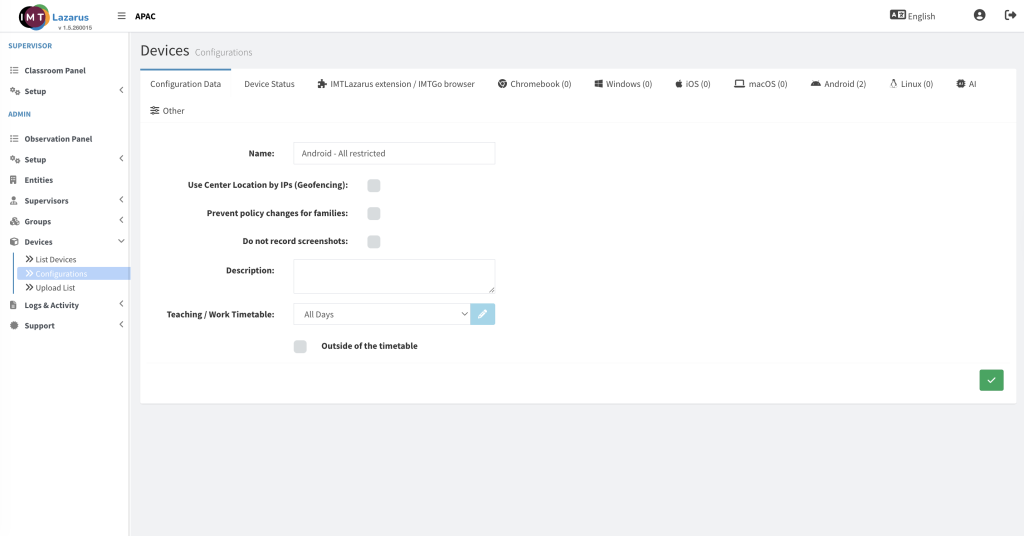
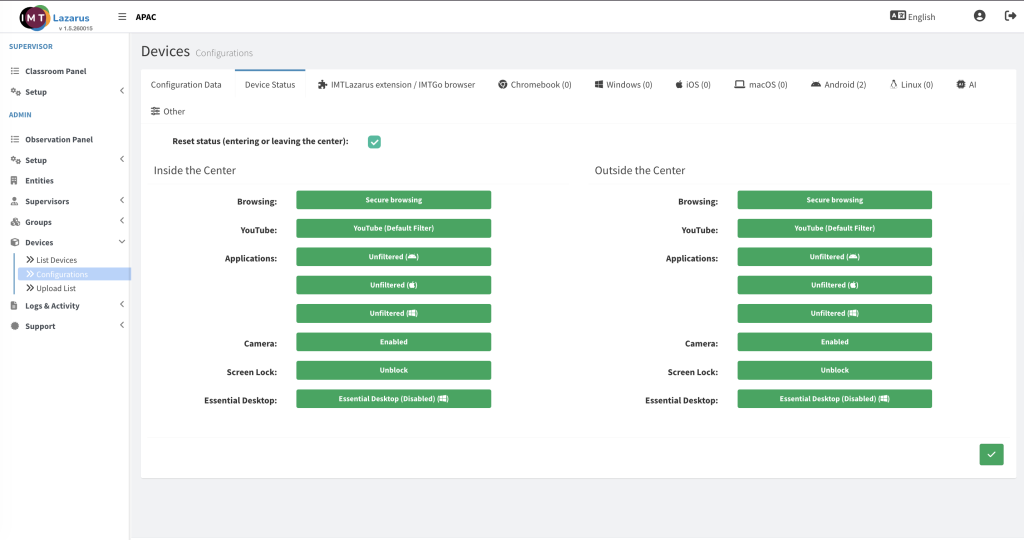
IMTLazarus natively fulfills this requirement by executing multi-contextual policy switching based on time parameters, physical boundaries, and directory roles. The platform features an advanced scheduling engine that automatically alters filtering behaviors when transitions occur between designated school hours and out-of-school periods. By combining custom Timetables with automated toggles like Outside of the timetable, the system dynamically scales back or reinforces web restrictions, application controls, and monitoring rules to reflect the device's immediate usage context.
👨💻 Administrator Steps
Admin Setup Steps for Req 2.30
Enforce Location and Role Rules: Map this time-dependent configuration to specific structural groups synchronized from your DepEd directory, ensuring that restrictions deploy automatically based on user roles and spatial contexts.
Establish the Filtering Schedule: Navigate to Admin > Setup > Timetables to build the primary temporal boundaries defining standard operational or school hours.
Configure Contextual Profile Behavior: Go to Admin > Devices > Configurations, select your target platform configuration, and assign your master schedule using the Teaching / Work Timetable dropdown.
Define After-School Parameters: Check the box for Outside of the timetable to activate the secondary contextual branch, which automatically alters or relaxes restrictive policies when school hours conclude.
🖼️ Visual Evidence