-
Application Management
-
Certifications
-
Data Privacy
-
Enrollment
-
Filtering
- Req 2.25: Filtering Architecture
- Req 2.26: Category & Policy Management
- Req 2.27: Content Filtering Controls
- Req 2.28: Provide YouTube and streaming controls including:
- Req 2.29: Provide protective tools such as image blurring an...
- Req 2.30: Time-Based & Context-Based Filtering
- Req 2.31: Policy Enforcement & Overrides
- Req 2.32: Alerts, Events & Violations
- Req 2.33: DNS-Layer Protection for BYOD/Guest Devices
- Req 2.62: Support on-device decision engines for filtering, ...
- Req 2.63: Allow content-filtering rules and device policies ...
- Req 2.91: The Supplier shall ensure that devices remain prot...
-
Hosting
- Req 2.64: Ensure uninterrupted operation through redundant c...
- Req 2.65: Maintain automated policy synchronization between ...
- Req 2.66: Support nationwide distribution with auto-scaling ...
- Req 2.67: Ensure reliable delivery of logs, telemetry, and m...
- Req 2.8: The MDM platform shall be hosted in a secure, clou...
- Req 2.89: The MDM platform shall operate within cloud infras...
-
Licensing
- Req 2.68: Licenses shall be issued on a per-device, transfer...
- Req 2.69: The MDM subscription shall be valid for one (1) ye...
- Req 2.72: A license shall begin its subscription validity on...
- Req 2.73: Unassigned licenses shall remain in the license po...
- Req 2.74: The Supplier shall ensure that license status and ...
- Req 2.75: Licenses shall be transferable between devices at ...
- Req 2.76: Decommissioned devices may have their licenses rea...
- Req 2.77: The MDM platform shall support license expansion f...
- Req 2.78: Additional licenses procured under separate activi...
- Req 2.79: Adding new licenses shall not require system downt...
-
Migration
- Req 2.82: DepEd shall retain the ability to export device in...
- Req 2.83: All exports must be provided in non-proprietary fo...
- Req 2.84: No additional licensing or fees shall be required ...
- Req 2.85: The Supplier shall ensure that all configurations,...
- Req 2.86: No vendor-lock-in mechanisms shall impede DepEd fr...
-
Organization
- Req 2.10: Enforce hierarchy-based policy inheritance where c...
- Req 2.53: Support drill-down by school, division, region, an...
- Req 2.59: Assign delegated administration rights to Regions,...
- Req 2.6: Support dynamic, conditional configuration profile...
- Req 2.60: Support multi-layer hierarchical administration al...
- Req 2.70: The Supplier shall provide administrative accounts...
- Req 2.71: Administrative roles shall support granular, role-...
-
Policies
-
Privacy
-
Proceses
- Req 2.101: The Supplier shall prepare a transition plan enabl...
- Req 2.102: The Supplier shall provide ongoing advisory suppor...
- Req 2.94: The Supplier shall support DepEd in establishing a...
- Req 2.95: The Supplier shall assist DepEd in developing stan...
- Req 2.96: The Supplier shall assist DepEd in defining govern...
- Req 2.97: The Supplier shall guide DepEd in selecting, refin...
- Req 2.98: The Supplier shall support pilot testing and early...
-
Reports
- Req 2.21: Maintain a comprehensive, continuously updated dev...
- Req 2.22: Generate automated alerts for, among others:
- Req 2.23: Provide tamper-evident audit logs covering configu...
- Req 2.24: Provide exportable inventory reports and dashboard...
- Req 2.34: Dashboards & Role-Based Views
- Req 2.35: Application & Device Usage Analytics
- Req 2.36: Instructional & Engagement Analytics
- Req 2.37: Operational & Financial Analytics
- Req 2.38: Network & Device Health Monitoring
- Req 2.39: Anomaly, Incident & Early-Warning Analytics
- Req 2.40: Data Privacy Governance Analytics
- Req 2.41: Reports, Exports & API Integration
- Req 2.52: Provide exportable reports summarizing active, res...
- Req 2.54: Integrate with compatible environments for analysi...
-
Risk Management
- Req 2.42: AI-Based Risk Detection Engine
- Req 2.43: Provide continuous and scheduled monitoring of onl...
- Req 2.44: Allow adjustment of detection sensitivity by age g...
- Req 2.45: Ensure alignment with DepEd safeguarding framework...
- Req 2.46: Automatically route identified incidents to design...
- Req 2.47: Maintain secure workflows for review, intervention...
- Req 2.48: Record incident context including triggering conte...
- Req 2.49: Maintain a complete audit trail of all actions tak...
-
System Configurations
- Req 2.11: Allow granular restriction of hardware features (c...
- Req 2.13: Enforce network restrictions such as mandatory VPN...
- Req 2.17: Allow administrators to remotely lock, wipe, and a...
- Req 2.18: Enforce security policies including mandatory pass...
- Req 2.19: Disable developer mode, USB debugging, or unauthor...
- Req 2.20: Configure Wi-Fi, VPN, and proxy settings according...
- Req 2.5: Provide creation, deployment, and enforcement of b...
- Req 2.56: Integrate with DepEd’s identity platforms such as ...
- Req 2.61: Support PKI/SCEP or equivalent certificate-based a...
- Req 2.7: Ensure functional parity across all OSes for enrol...
- Req 2.8: Enforce compliance checks and automatically apply ...
- Req 2.81: All updates, enhancements, version upgrades, and n...
- Req 2.9: Apply time-based and location-based restrictions (...
-
Training
- Req 2.103: The Supplier shall implement a nationwide train-th...
- Req 2.104: Training shall combine instructor-led sessions (in...
- Req 2.105: The Supplier shall provide complete training mater...
- Req 2.106: Platform-specific training tracks shall be deliver...
- Req 2.107: The Supplier shall conduct follow-up and refresher...
- Req 2.108: A structured learning program shall be implemented...
- Req 2.109: Knowledge-transfer activities shall include system...
- Req 2.110: Post-training evaluation shall be conducted throug...
- Req 2.111: All training man-hours, logistics, access to onlin...
- Req 2.112: The Supplier shall design the training program ins...
- Req 2.113: Provide specialized training for users at various ...
-
Updates
Req 2.22: Generate automated alerts for, among others:
📋 Requirement Details
Req 2.22: Generate automated alerts for, among others:
1. Newly enrolled or newly detected devices;
2. High-risk or critical actions executed on managed endpoints.
⚙️ Technical Demonstration
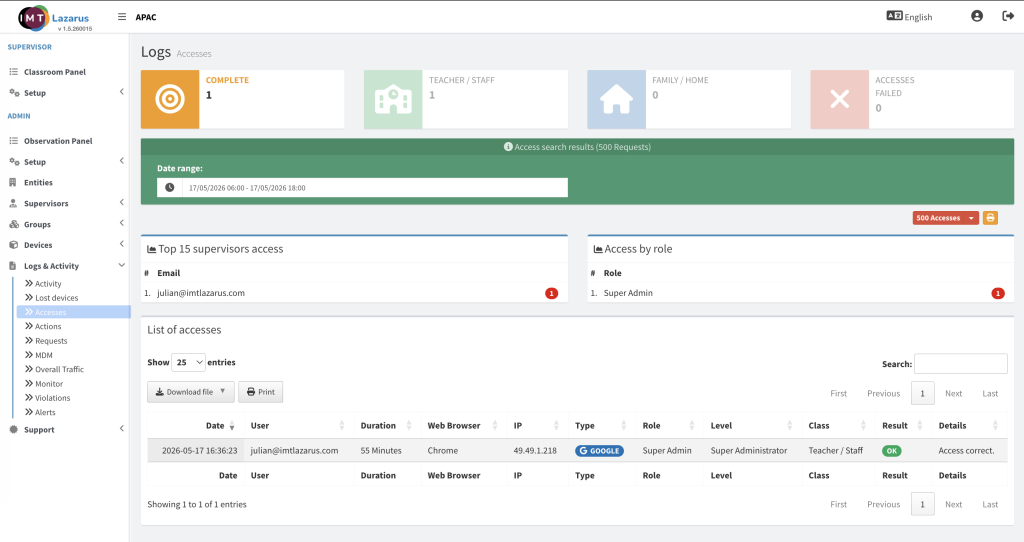
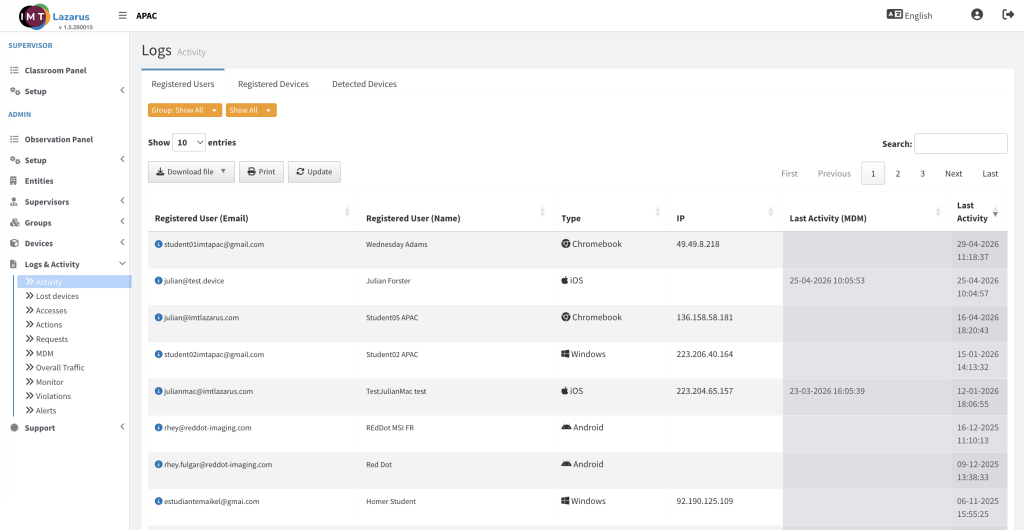
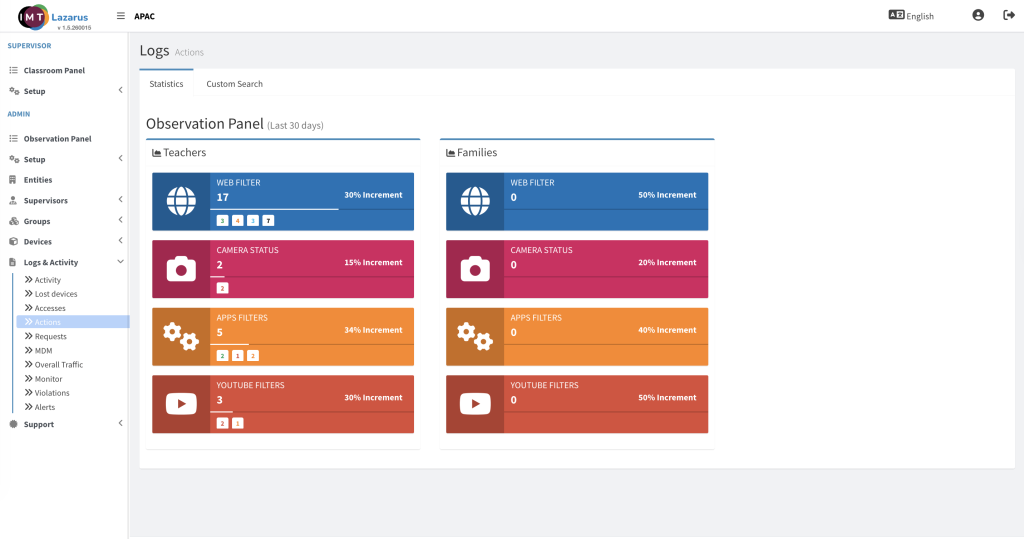
IMTLazarus natively fulfills this requirement through a centralized security auditing and notifications framework located under the Logs & Activity ecosystem. The platform captures real-time endpoint telemetries and generates structured entries for critical lifecycle and compliance events. This includes dedicated monitoring panels for tracking newly registered assets (Device Enrollments) alongside persistent logs for high-risk or critical actions (such as system modifications, policy bypasses, or blocked actions), ensuring immediate operational visibility into DepEd fleet exceptions.
👨💻 Administrator Steps
Admin Setup Steps for Req 2.22
Configure Automated Notifications: Navigate to Admin > Setup > Notifications to map specific alert triggers (such as enrollment success or critical policy violations) directly to administrative emails or system webhooks.
Access Audit Logs: Log into the IMTLazarus dashboard and navigate to the left sidebar menu, expanding the Logs & Activity tab.
Track New Device Detections: Click on Device Enrollments to audit a live log of newly registered endpoints, tracking their authorization source, installation timestamps, and enrollment status.
Monitor Critical Endpoint Actions: Select the Logs sub-menu to view the system wide event feed, filtering by severity or action type to isolate high-risk operational events executed on managed endpoints.
🖼️ Visual Evidence