Req 2.13: Enforce network restrictions such as mandatory VPN...
📋 Requirement Details
Req 2.13: Enforce network restrictions such as mandatory VPN profiles, forced Wi-Fi configurations, and prevention of unauthorized network access.
⚙️ Technical Demonstration
IMTLazarus completely satisfies this requirement by providing robust, administrative network perimeter controls at the profile layer. The system allows DepEd to enforce specific wireless parameters, inject enterprise configuration payloads, lock down the active status of communications hardware, and completely mitigate unauthorized network access or connection bypass attempts.
The network restriction architecture delivers three primary compliance layers:
Controlled Encryption Tunnels & Access Prevention: To block unmonitored proxy tunnels, administrators can restrict profile creation through the dashboard toggle Allow creation of VPN configurations. Disabling this option prevents users from installing unmanaged third-party VPN profiles that could be used to bypass safety policies. Additionally, checking the box Only allow devices to connect to Wi-Fi networks configured using a profile ensures endpoints remain isolated from unauthorized networks, untrusted home routers, or rogue mobile hotspots.
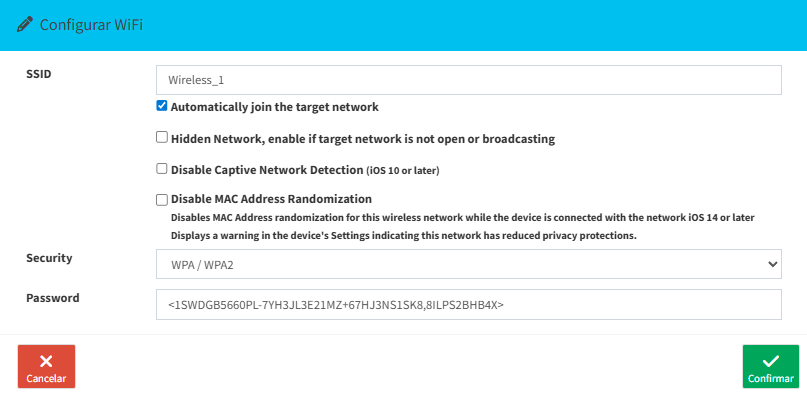
Forced Wi-Fi Configuration Payloads: As demonstrated in Wifi profile.png, administrators can remotely construct and provision explicit wireless profiles to the fleet. By designating specific Service Set Identifiers (SSIDs) and embedding enterprise encryption parameters (e.g., WPA/WPA2 keys), the system automates corporate network onboarding. Enforced payloads bypass user intervention and mandate that terminals dynamically lock onto legitimate institutional routers.
Continuous Hardware & Connection Status Enforcement: As illustrated in the management parameters of restricciones.png, the system can lock hardware radios to prevent students from going offline. Turning on the Force Wi-Fi status enabled restriction ensures that the Wi-Fi connection cannot be disabled in Settings or Control Center, even by turning Airplane Mode on or off, securing persistent device visibility.
👨💻 Administrator Steps
Provide step-by-step guidance here...
🖼️ Visual Evidence