Req 2.20: Configure Wi-Fi, VPN, and proxy settings according...
📋 Requirement Details
Req 2.20: Configure Wi-Fi, VPN, and proxy settings according to DepEd network and security standards.
⚙️ Technical Demonstration
Req 2.20 Compliance: Granular Network Routing, Proxy, and Security Parameter Configuration
IMTLazarus completely satisfies this requirement by offering a unified, centralized network management plane within its core profile editor. The system enables DepEd network administrators to push complete connectivity baselines that align with institutional network and security standards. From a single console interface, administrators can configure secure Wi-Fi access points, deploy enterprise VPN structures, enforce web proxy routes, and lock down Domain Name System (DNS) properties across the entire endpoint fleet:
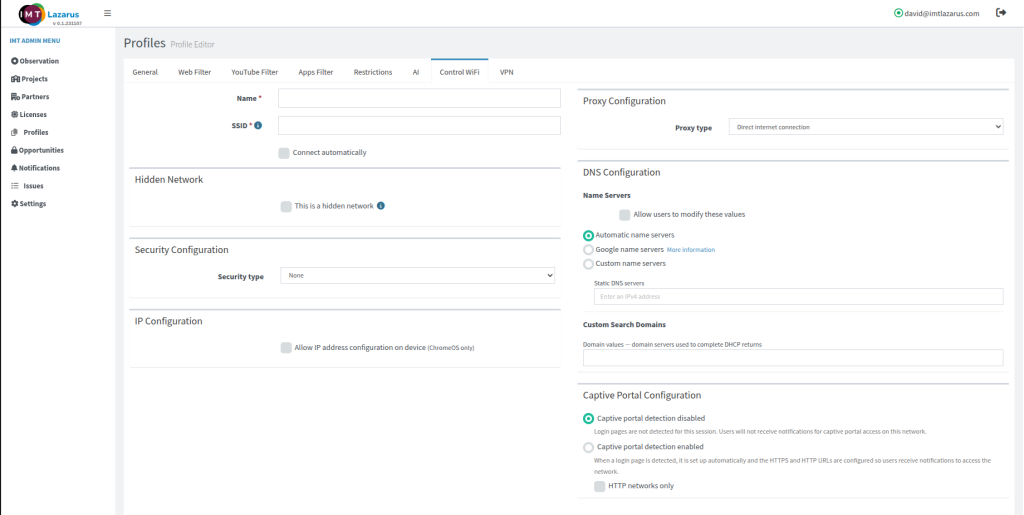
- Granular Wi-Fi Payload Management: As displayed in 2.2.png, the Control WiFi module provides complete control over local radio onboarding. Administrators can configure specific SSID network identifiers, mandate background handshakes via the Connect automatically toggle, flag stealth configurations using the This is a hidden network selector, and assign official enterprise encryption layers via the Security type menu.
- Unified Proxy and Routing Management: To comply with DepEd network security standards, the console features a dedicated Proxy Configuration module. This allows central IT to manage data routing parameters across all endpoints. Administrators can set the Proxy type to route traffic through official web gateways or enforce a Direct internet connection baseline, effectively blocking unapproved local proxies or unmanaged routing changes.
- Tamper-Proof DNS Hardening: The infrastructure features a comprehensive DNS Configuration utility to prevent web-filtering bypasses via custom name servers. Administrators can switch between Automatic name servers, Google name servers, or lock down specific IP paths via Custom name servers. By keeping the Allow users to modify these values checkbox disabled, the platform makes network configuration blocks permanent at the system level.
Security Standards Network Configuration Matrix
The network configuration engine structures its parameters across four key operational modules within the profile editor:
| Network Security Objective | Dashboard Module Configuration | Structural Enforcement Outcome |
| Automated Local Access | Control WiFi Panel Parameters (2.2.png) | Authenticates endpoints to campus Wi-Fi networks automatically, keeping passwords hidden from users. |
| Enforced Traffic Routing | Proxy Configuration Selection (2.2.png) | Forces web traffic through approved security routes, preventing manual browser-bypass configurations. |
| Bypass Prevention | DNS Configuration Controls (2.2.png) | Locks down name resolution paths to prevent users from using rogue DNS servers to bypass content blocks. |
| Secure Connection Gateways | Dedicated VPN Interface Tab (2.2.png) | Mandates end-to-end data encryption for off-campus devices by forcing traffic through approved institutional gateways. |
🖼️ Visual Evidence